
USB and XLR Mic with RGB and Mute Button - FIFINE AM8
As an Amazon Associate we earn from qualifying purchases, at no extra cost to you.
The FIFINE AM8 is a USB/XLR dynamic microphone reviewed by JDubb, and it earns a straightforward recommendation as a flexible, practical pick for streamers, podcasters, and home recorders who want one mic that can grow with their setup.
What the AM8 Actually Is
The AM8 is a dynamic microphone, which matters more than most listings let on. Dynamic mics are built to focus on the sound directly in front of them and ignore a lot of what’s happening around them. If you’re at a desk with a PC fan running, roommates in the next room, or a mechanical keyboard clacking away, that natural rejection of background noise is a real practical advantage. It’s not just a spec on a sheet.
It ships with a desktop stand included, so you’re not hunting for an arm or a mount before you can use it. That’s a low-friction way to get started.
Two Connection Options, One Mic
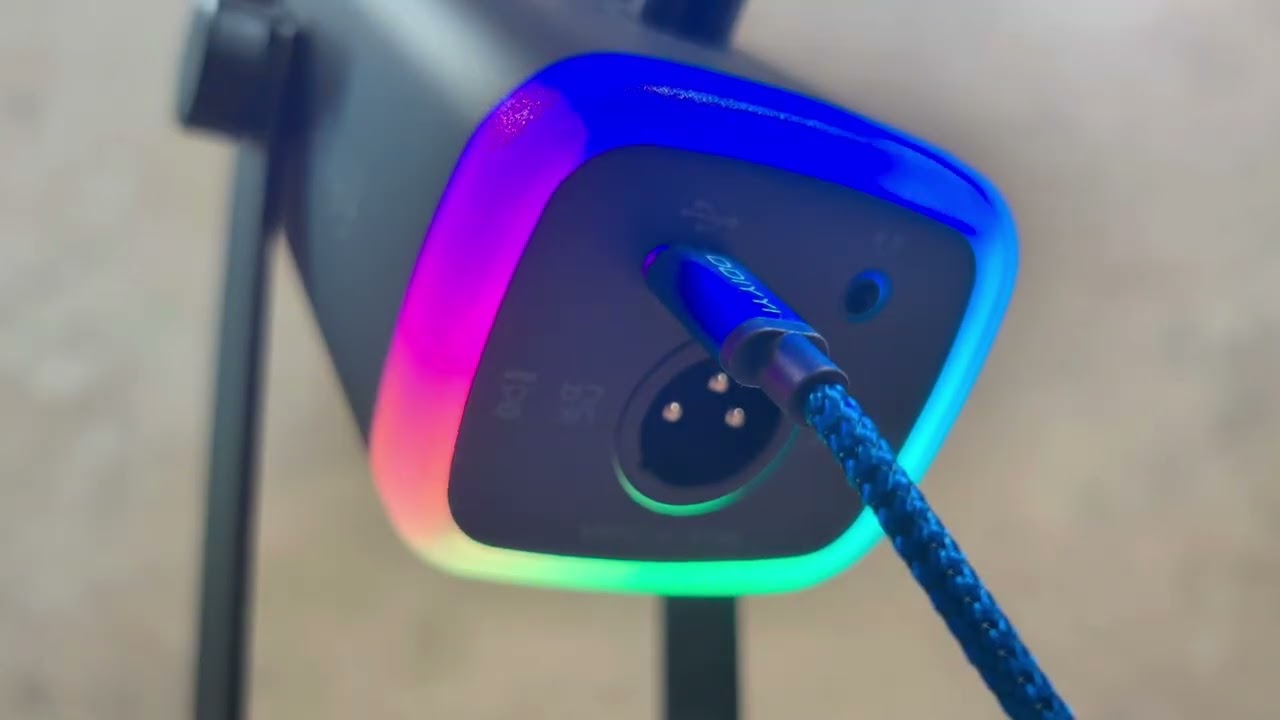
The headline feature here is the dual USB and XLR connectivity. Plug it into a PC via USB and it works immediately, no drivers, no extra gear. That’s the right way to start out. But if you eventually pick up an audio interface and want more control over your signal chain, the XLR output is already there. You don’t need to buy a different mic when your setup gets more serious. That kind of forward compatibility is genuinely useful and not something every budget-friendly mic bothers to include.
The Controls You Actually Reach For
The mute button sits right on the mic body. This sounds minor until you’re mid-session and need to cut your audio fast. Reaching for a software toggle or a separate controller adds friction. Having a physical button on the mic itself is the right call.
The headphone jack is the other feature worth calling out. Plugging headphones directly into the mic lets you hear your own voice in real time while you’re recording or streaming. That kind of direct monitoring means you’re not finding out after the fact that something sounded off. You hear exactly what’s going into your recording as it happens.
RGB and the Look of the Thing
The AM8 has RGB lighting built in. If you’re streaming or recording video, the way your desk looks on camera matters to a lot of people. The lighting adds a clean visual element without requiring a separate RGB controller or extra software setup. Not everyone cares about this, but for people building out a streaming aesthetic, it’s a nice inclusion rather than an afterthought.
Who This Fits
Someone just getting into podcasting, gaming commentary, or YouTube who doesn’t want to buy a starter mic and then replace it in six months will find the AM8 worth considering. The USB side handles the beginning. The XLR side handles growth. The mute button and headphone jack are genuinely useful daily-use features, not just spec-sheet padding. JDubb’s take is that this is a capable mic designed around how people actually use their setups, and it’s hard to argue with that framing.
Common questions
- Can the FIFINE AM8 connect to both USB and XLR?
- Yes. The AM8 supports both USB and XLR connections. You can use USB for a direct plug-and-play connection to a PC, or use XLR when running it through an audio interface.
- Does the AM8 have real-time headphone monitoring?
- It does. There is a headphone jack built into the mic that lets you hear your audio as you record or stream, so you can catch problems while they're happening rather than after the session ends.
- Is the desktop stand included with the AM8?
- Yes, a desktop stand is included with the mic, so you can set it up right away without purchasing a separate mount or boom arm.
- Why does it matter that the AM8 is a dynamic mic?
- Dynamic mics are naturally less sensitive to background noise and focus more on sound coming directly from the source. That makes them a practical choice for desk setups where ambient noise like fans or room noise is a factor.